
Cloud Wallet
The Cloud Wallet is the managed wallet mode inside UIN Wallet. It is designed for fast internal transfers, alias-based payments, App Center access, and optional on-chain withdrawals.
Cloud Wallet Screen
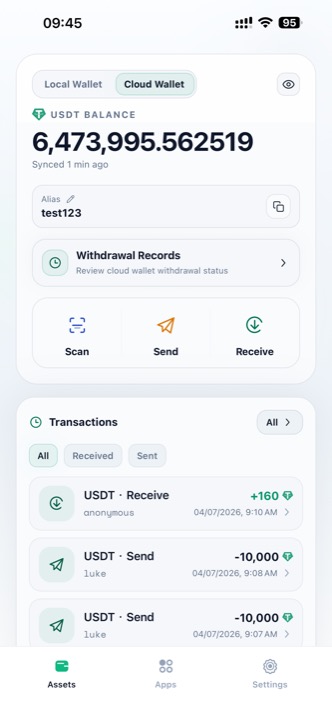
Cloud Wallet balance, alias, and records
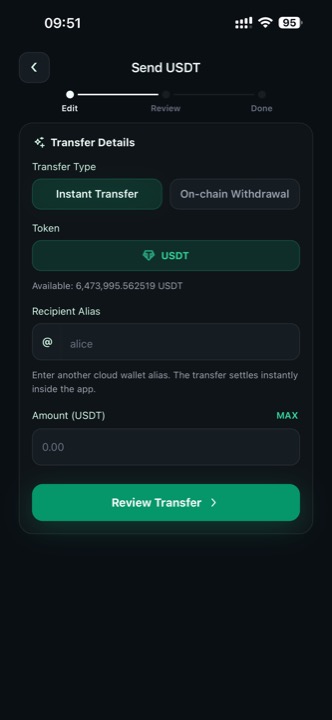
Instant transfer by alias
What You Can Do
| Feature | Description |
|---|---|
| Alias | A readable account name that other cloud wallet users can send to |
| Instant Transfer | Send USDT to another cloud wallet alias and settle inside the app |
| On-chain Withdrawal | Send USDT from the cloud wallet to a TRON or Ethereum address |
| Withdrawal Records | Review historical cloud wallet withdrawals and statuses |
| Apps | Open Anonymous Mixer, Anonymous Collection, and other cloud-enabled tools |
Alias
Your alias appears below the cloud wallet balance card. Other users can use this alias as the recipient when they make an Instant Transfer from their own cloud wallet.
Use aliases carefully:
- Confirm the alias spelling before sending
- Treat aliases like payment identifiers
- If you share your alias publicly, other users may be able to identify you as the payment target
Transfer Types
Cloud Wallet supports two transfer types on the send screen:
Instant Transfer
- Available in Cloud Wallet mode only
- Recipient is another cloud wallet alias such as
@alice - Settlement happens inside the app instead of on-chain
- Best for fast transfers between cloud wallet users
On-chain Withdrawal
- Available in Cloud Wallet mode
- Recipient is a blockchain address on TRON or Ethereum
- Use this when funds need to leave the cloud wallet and move on-chain
See Send USDT for the full step-by-step flow.
App Center Integration
Cloud Wallet is the required balance source for these privacy-focused apps:
The App Center also lists supporting tools such as Industry Watch, TRON Resource Desk, and TRONSCAN. See Apps.
Deposit Notice
Cloud Wallet Deposit Rules
When you deposit to a cloud wallet address, only send supported USDT on the selected network:
- On TRON, send USDT-TRC20 only
- On Ethereum, send USDT-ERC20 only
Do not send TRX, ETH, or unsupported tokens to the cloud wallet receive address.