
Backup Seed Phrase
Your 12-word seed phrase is the master key to your wallet. It is the only way to restore your funds if you lose your device.
DANGER
If you lose your seed phrase, your funds are permanently inaccessible. UIN cannot recover it for you. Back it up immediately after creating your wallet.
Viewing Your Seed Phrase
- Go to Settings → Backup Seed Phrase
- Enter your wallet password to unlock the backup screen
- Your 12 words are revealed in numbered order
How to Back Up Safely
Recommended — Physical backup:
- Write all 12 words on paper in the correct numbered order
- Store the paper in a secure, fireproof location (e.g. a safe)
- Consider making two copies stored in different locations
Avoid:
- Screenshots (can be accessed if your device is compromised)
- Cloud notes or email (online storage is a security risk)
- Sharing with anyone, ever
Seed Phrase in the Create Wallet Flow
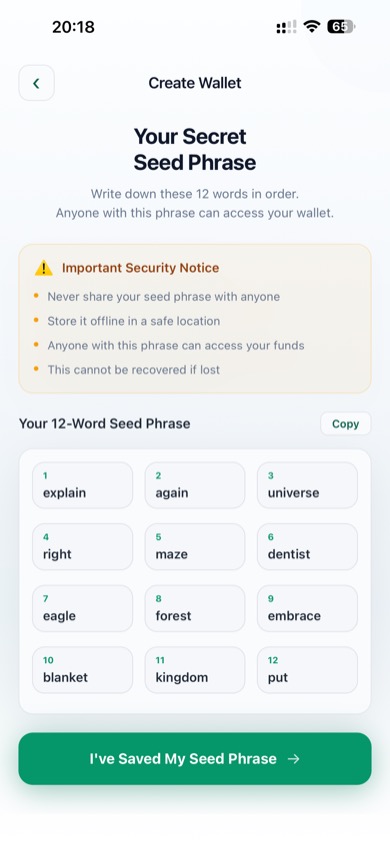
Your seed phrase shown during wallet creation
During wallet creation, your seed phrase is displayed on a dedicated screen. Tap Copy if you need to temporarily use your clipboard — but delete it immediately after writing it down.
After tapping I've Saved My Seed Phrase, you must confirm the words in order before the wallet is finalized.
Restoring From Backup
If you ever need to restore your wallet on a new device, use Restore Wallet on the welcome screen and enter all 12 words in the correct order. See Restore a Wallet for full instructions.