
Transaction History
UIN Wallet keeps a complete history of all your on-chain transactions.
Accessing Transaction History
From the Assets screen, tap All → in the Transactions panel to open the full transaction history page.
You can also tap any individual transaction row in the panel to jump directly to its detail view.
Transaction List
The transaction list shows all activity for your current wallet address and network. Use the filter tabs to narrow down what you see:
| Tab | Shows |
|---|---|
| All | Every transaction |
| Received | Incoming transfers only |
| Sent | Outgoing transfers only |
Transaction Row
Each row in the list displays:
- Icon — direction indicator (arrow up = sent, arrow down = received)
- Token · Direction (e.g.
USDT · Receive,TRX · Receive) - Truncated hash — partial transaction ID
- Amount —
+for received,−for sent, in USDT or TRX - Date and time
Tap any row to open the transaction detail view.
Transaction Detail
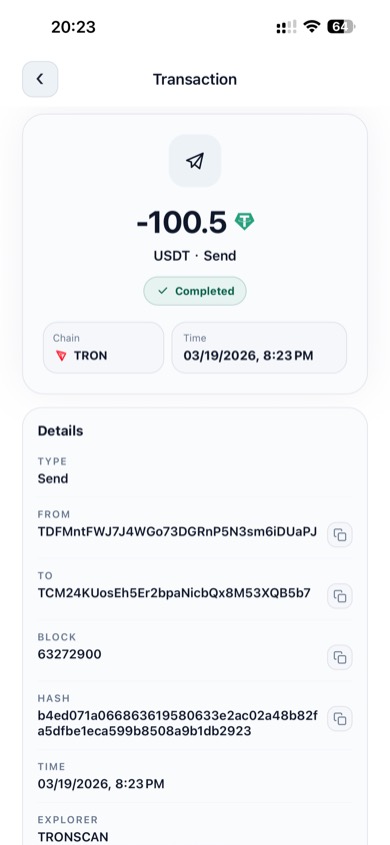
Detailed view of a completed USDT send
The transaction detail screen shows the complete on-chain record:
| Field | Description |
|---|---|
| Amount | Token amount and direction |
| Status badge | Completed, Pending, or Failed |
| Chain | TRON or Ethereum |
| Time | Date and time of confirmation |
| Type | Send or Receive |
| From | Sender's wallet address |
| To | Recipient's wallet address |
| Block | Block number where the transaction was confirmed |
| Hash | Full transaction hash |
| Explorer | Link label to view on the block explorer (TRONSCAN / Etherscan) |
Tap the copy icon next to any address or hash to copy it to your clipboard.
Withdrawal Records (Cloud Wallet)
When using Cloud Wallet mode, tap Withdrawal Records on the Assets screen to see your withdrawal history.
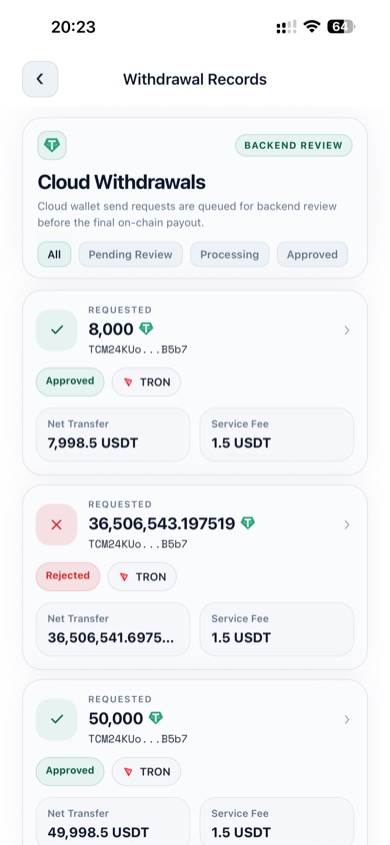
Cloud wallet withdrawal records
Each withdrawal card displays:
- Requested USDT amount
- Recipient address (truncated)
- Current status (Pending Review / Processing / Approved / Rejected)
- Network (TRON or Ethereum)
- Net transfer (amount after service fee)
- Service fee
See Cloud Wallet for a full explanation of the withdrawal workflow and statuses.