
Local Wallet
The Local Wallet is UIN Wallet's fully self-custodial mode. Your private keys are derived on-device from your seed phrase and are never transmitted anywhere.
How It Works
When you create or restore a wallet, UIN Wallet uses your seed phrase to derive up to 10 addresses per blockchain using the BIP-44 standard:
| Chain | Derivation Path |
|---|---|
| TRON | m/44'/195'/0'/0/{0–9} |
| Ethereum | m/44'/60'/0'/0/{0–9} |
All 10 addresses belong to the same seed phrase. You can switch between them freely, and each address has its own independent balance, history, and network resources.
Switching Between HD Addresses
- On the Assets screen, make sure Local Wallet is selected
- Tap the Address row (shows the current address name and BIP-44 path)
- The HD address selector opens. Choose a chain (TRON or Ethereum) and an address index (0–9)
- Your selection is saved and the balance updates automatically
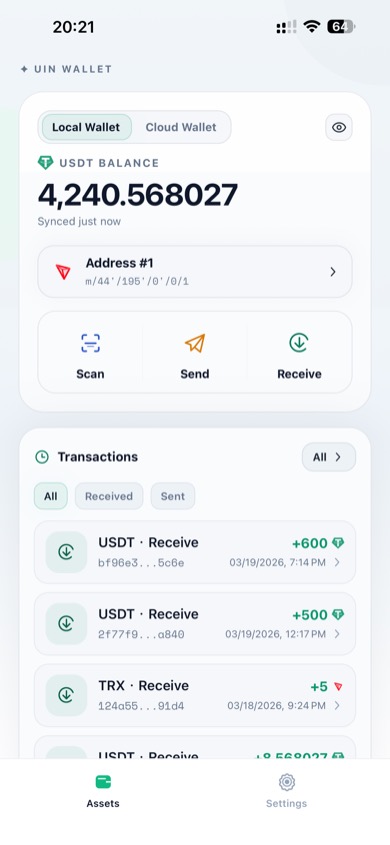
Address #1 selected — TRON path m/44'/195'/0'/0/1
TIP
Use different address indices to separate funds or maintain privacy across different counterparties.
TRON Resource Management
When the selected address is on TRON, the Assets screen shows a TRX Resources row. Tap it to open the resource management page for that exact TRON address.
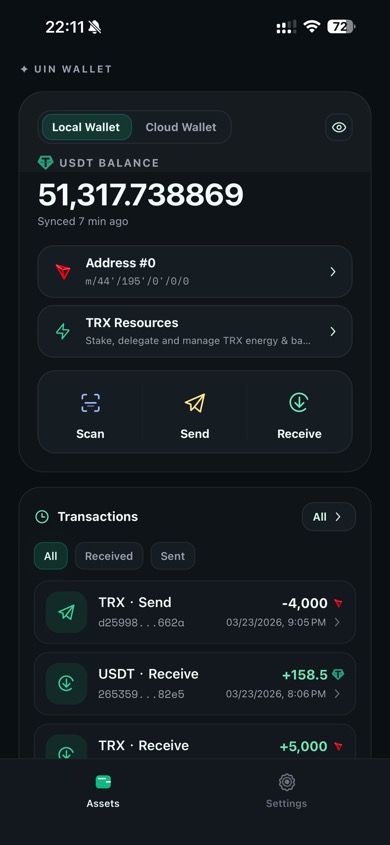
On a TRON address, tap the TRX Resources row to view energy, bandwidth, staking, and delegation
This is the most important point to remember: TRON resources are calculated per address, not shared across every address from the same seed phrase.
Address #0andAddress #1can come from the same seed phrase but still have different TRX balances, USDT balances, bandwidth, energy, and staking status- When you send USDT, the app uses the resources and TRX of the currently selected TRON address
- TRX or energy on another address does not automatically pay fees for the current sending address
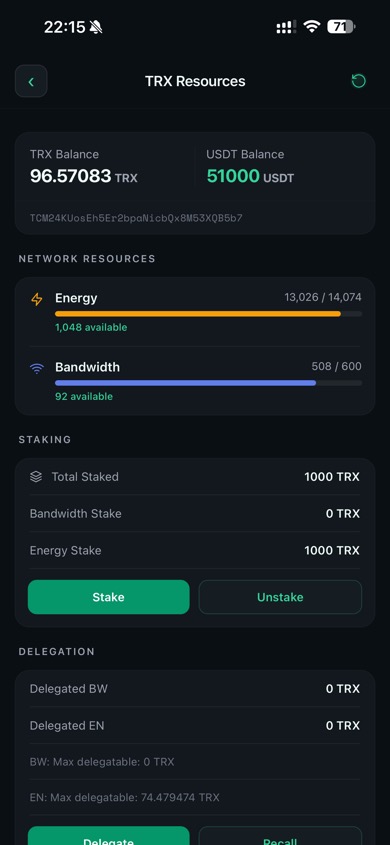
The TRX Resources page shows remaining energy, remaining bandwidth, staking allocation, and delegation status
What Are Bandwidth and Energy?
You can think of them as two different types of network allowance on TRON:
| Resource | Plain-language meaning | Common use |
|---|---|---|
| Bandwidth | The space needed to record a transaction on-chain | Used by almost all transactions, such as sending TRX, sending USDT, staking, and unstaking |
| Energy | The execution power needed to run a smart contract | Used mainly for contract calls, especially TRC-20 USDT transfers |
If you only remember one sentence:
- Bandwidth helps get the transaction written onto the blockchain
- Energy helps the smart contract actually run
That is why a TRC-20 USDT transfer on TRON usually consumes both:
- some bandwidth
- some energy
If either resource is insufficient, TRON can charge the address directly in TRX instead. This is why users sometimes have enough USDT but still cannot send it.
Why can I have USDT but still fail to send?
USDT is the asset you are sending, but the network cost on TRON is usually paid by the current address's resources or TRX.
If the address has USDT only, but lacks TRX, bandwidth, or energy, the transfer may still fail.
Why Stake TRX for Energy?
For addresses that often send TRC-20 USDT, staking TRX for energy is usually the most useful setup.
- It can reduce how much TRX gets burned for each USDT transfer
- It makes repeated transfers easier because the address has its own resource reserve
- It makes costs more predictable for merchants, OTC desks, and high-frequency senders
- Energy recovers over time, so one staking position can keep supporting future transfers
In practical terms, if an address sends USDT regularly, staking more TRX to Energy often helps more than leaving the same TRX idle in the balance.
How To Read the Resource Screen
| Field | Meaning |
|---|---|
| TRX Balance | The amount of TRX held by the current TRON address. If resources are not enough, TRON may burn TRX from here to pay the fee. |
| USDT Balance | The amount of TRC-20 USDT held by the current address. |
| Energy | The current energy usage for this address. In a value like 13,026 / 14,074, you can read it as used / total, and the available text shows what remains. |
| Bandwidth | The current bandwidth usage for this address. In a value like 508 / 600, the address has used 508 out of 600, so only 92 remain available. |
| Total Staked | Total TRX currently staked by this address. |
| Bandwidth Stake / Energy Stake | How much staked TRX is allocated to bandwidth or energy. Addresses that send USDT frequently usually benefit more from Energy Stake. |
| Delegated BW / Delegated EN | Resources this address has delegated to another address. |
Where Do Resources Come From?
TRON address resources usually come from four sources:
- Free daily bandwidth provided by the network
- Staking TRX to obtain more bandwidth or energy
- Delegation from another address that has staked resources
- Burning TRX directly when resources are not sufficient
What Uses Which Resource?
- Regular TRX transfers mainly consume bandwidth
- TRC-20 USDT transfers usually consume bandwidth and energy
- Contract interactions and approvals rely more on energy
- Stake, unstake, delegate, and undelegate operations also consume some bandwidth
What To Do If Resources Are Not Enough
If a TRON transfer fails or the fee estimate looks high, check these items in order:
- Make sure you are sending from the correct TRON address
- Check whether that address still has enough TRX
- If the address sends USDT often, consider staking more TRX to Energy
- If the address is used only occasionally, topping it up with a small amount of TRX may be enough
- If another address holds spare resources, consider using delegation to support the current address
According to the TRON resource model, bandwidth and energy recover gradually after use, typically within 24 hours.
Sending from Local Wallet
When you send from Local Wallet, the transaction is signed locally on your device and broadcast directly to the blockchain. No intermediary is involved.
You will need to enter your wallet password to authorize each send. See Wallet Password for setup instructions.
Network fees (TRX for TRON, ETH for Ethereum) are automatically estimated and shown on the review screen before you confirm.
If a USDT transfer cannot be submitted even though the balance looks sufficient, the most common cause is that the selected sending address does not hold enough TRX or ETH to cover the network fee.
If you are using a TRON address, open the TRX Resources page first and confirm that the current address still has enough energy, bandwidth, or TRX.
See Send USDT for the full transfer flow.
Security
- Private keys never leave your device
- The seed phrase is encrypted with your device's secure storage (iOS Keychain / Android Keystore)
- The wallet password adds an extra layer of protection for send operations