Skip to content

Settings

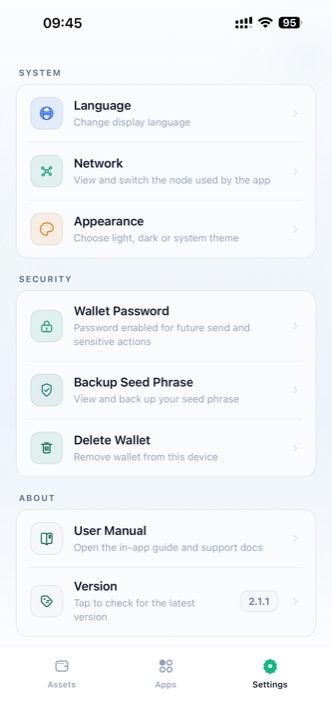
The Settings screen lets you customize language, appearance, network, and security preferences.

Settings screen

Settings (light mode)

Access settings by tapping the Settings tab in the bottom navigation bar.


System

Language

Change the display language of the app.

Tap Language to see the full list of 17 supported languages:

LanguageCode
Englishen
简体中文zh
繁體中文zh-Hant
日本語ja
한국어ko
Españoles
Françaisfr
Deutschde
Portuguêspt
Русскийru
Italianoit
Türkçetr
हिन्दीhi
Bahasa Indonesiaid
ภาษาไทยth
Tiếng Việtvi
العربيةar

Your language preference is saved and applied immediately across the entire app.

Network

Select which backend node UIN Wallet connects to. Different nodes may be hosted in different geographic regions for lower latency.

The current node is shown as a subtitle under Network (e.g. Edge Node 01 · Cloudflare Singapore).

Appearance

Appearance - light theme

Light theme selected

Appearance - dark theme

Dark theme (system mode selected)

Choose how UIN Wallet looks on your device:

OptionDescription
Follow SystemAutomatically switch between light and dark based on your device's setting
DarkAlways use the dark navy theme (easier on eyes at night)
LightAlways use the clean white theme

Tap your preferred option — a green radio button confirms the selection. The change is applied instantly.


Security

Wallet Password

Set, change, or remove the local security password used for sending and sensitive confirmations. See Wallet Password for full details.

Backup Seed Phrase

View and copy your 12-word seed phrase (requires password verification). See Backup Seed Phrase for full details.

Delete Wallet

Permanently removes the wallet from this device, including all stored keys and preferences.

DANGER

Deleting the wallet is irreversible. Make sure you have your seed phrase backed up before proceeding — without it, your funds cannot be recovered.

To delete:

  1. Tap Delete Wallet
  2. Read the confirmation warning
  3. Enter your wallet password (if set)
  4. Confirm deletion

After deletion, the app returns to the Welcome screen where you can create or restore a wallet.


About

The Version row at the bottom shows the current app version (e.g. 1.4.0).