
Create a Wallet
Creating a new UIN Wallet generates a fresh BIP-39 12-word seed phrase and derives your TRON and Ethereum addresses from it.
Steps
1. Open the App
On first launch you will see the welcome screen. Tap Create New Wallet.
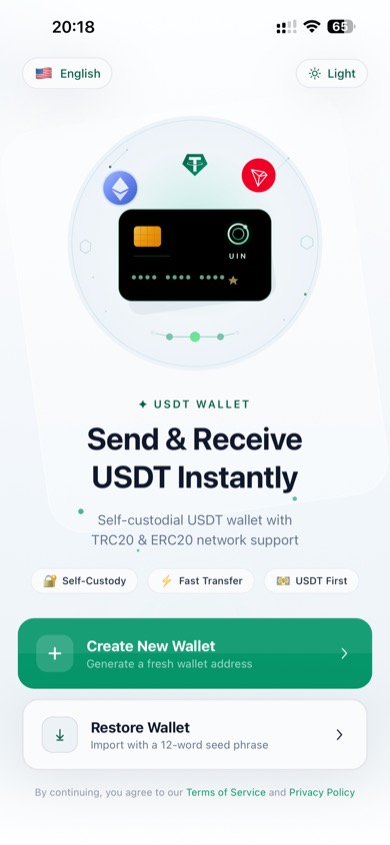
Welcome screen — tap "Create New Wallet"
2. Read Your Seed Phrase
UIN Wallet generates a unique 12-word seed phrase for you. This phrase is the only way to recover your wallet if you lose or replace your device.
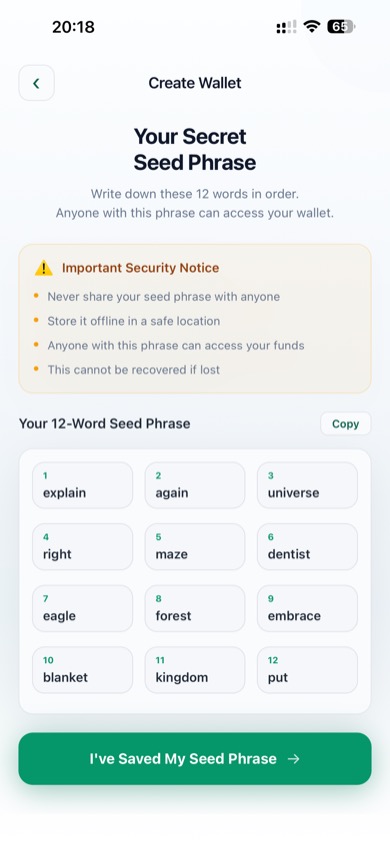
Your 12-word seed phrase
Critical Security Notice
- Never share your seed phrase with anyone
- Store it offline — write it on paper and keep it in a safe place
- Anyone with this phrase can access all your funds
- UIN cannot recover it if lost
Actions on this screen:
- Copy — copies all 12 words to your clipboard (use with caution)
- I've Saved My Seed Phrase — confirm you have recorded the words, then proceed
3. Confirm Your Seed Phrase
To ensure you have saved the words correctly, you must tap each word in the correct order from the word bank.
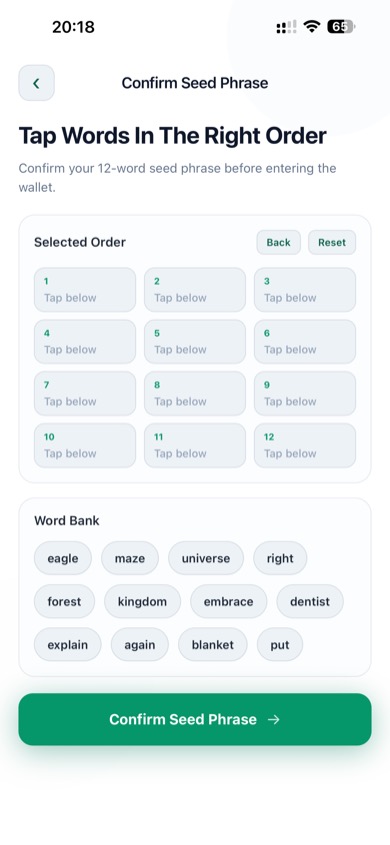
Tap words in order to verify your seed phrase
- Words are shown in random order in the Word Bank at the bottom
- Tap them one by one to fill in the Selected Order grid at the top
- Use Back to undo the last word, or Reset to start over
- Tap Confirm Seed Phrase when all 12 words are in the correct order
4. Wallet Created
Once confirmed, your wallet is created and you are taken to the Assets screen.
TIP
If you want to set a password for sending and sensitive actions, go to Settings → Wallet Password after your wallet is created. See Wallet Password for details.