
Wallet Password
The Wallet Password is a local security PIN that protects sensitive operations on your device — including sending funds and viewing your seed phrase.
TIP
The wallet password is device-only. It is never synced to the cloud and only the encrypted credential is stored locally — the plain text password is never saved.
Setting Up a Password
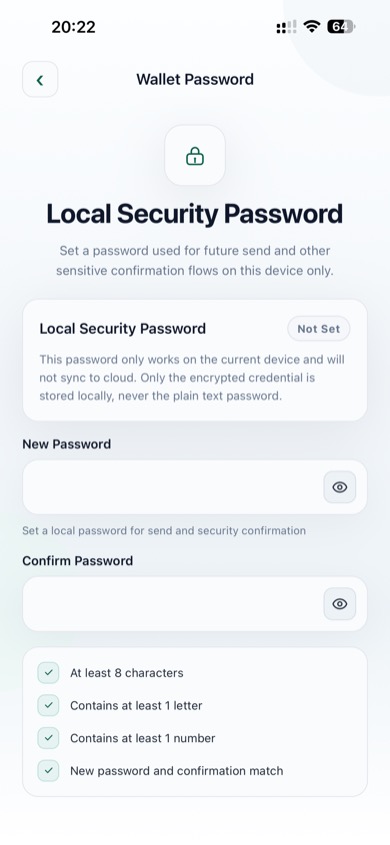
Local Security Password setup
To set a password:
- Go to Settings → Wallet Password
- Enter a New Password that meets all requirements:
- At least 8 characters
- Contains at least 1 letter
- Contains at least 1 number
- Enter the same password in Confirm Password
- Tap Set Password
All four requirement checks must show a green checkmark before you can save.
Password Requirements
| Requirement | Rule |
|---|---|
| Length | Minimum 8 characters |
| Letter | At least 1 alphabetical character |
| Number | At least 1 digit |
| Match | New password and confirmation must be identical |
Changing Your Password
- Go to Settings → Wallet Password
- Enter your current password to verify identity
- Enter and confirm the new password
- Tap Save
Removing Your Password
You can delete the wallet password from the password settings screen. You will be asked to verify the current password before it is removed.
WARNING
Removing the password means send operations and seed phrase backup will no longer require password verification. Only do this if you are the sole user of the device and it is already secured with biometrics or a device PIN.
Password Verification During Send
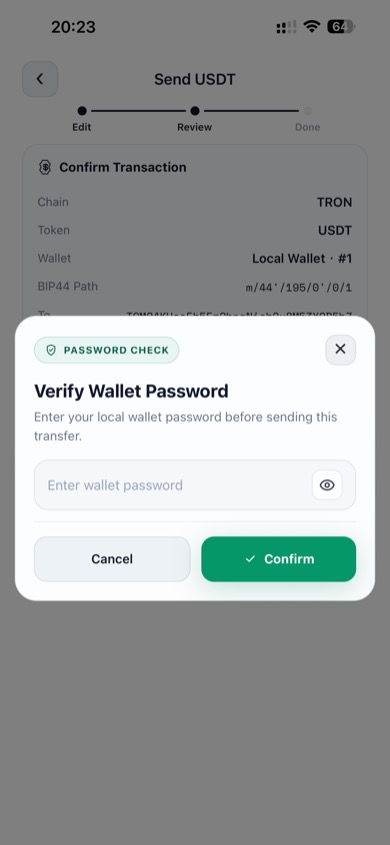
Password sheet appears before every transfer
Every time you send funds, the Verify Wallet Password sheet appears. Enter your password and tap Confirm to authorize the transaction. Tap Cancel or the × button to abort.